
Play/stop, record, undo, count-in, metronome, track selection, arming, and monitoring.
SYS://LOGIC-IPAD · FORBIDDEN SIGNAL ARCHIVE
Access the control.
Weaponize the noise.
Logic Pro for iPad, cracked open and rebuilt as a navigable signal system. Query the official knowledge, execute a field protocol, or trace the machine node by node.
THE MOST EXHAUSTIVELY INDEXED INDEPENDENT LOGIC PRO FOR IPAD RESOURCE WE COULD PUBLICLY VERIFYAudited 14 Aug 2026 · 1,149 official topics · See the evidence →SELECT ACCESS PATHTransmit a questionPlain-language decodeRun a field protocolExact steps for the jobScan every nodeComplete official index
TRY:
SELECT RECOVERY ROUTEWhere did the signal
Where did the signal
go dark?
You do not need to understand the architecture before you breach the damn building.
NEW TO LOGIC?
Blank project → finished first song
- 01 Create and name the project
- 02 Connect audio or MIDI
- 03 Record a clean take
- 04 Edit without wrecking it
- 05 Balance and add space
- 06 Bounce and verify
FULL PATH NOW LIVE: Open the Expert Info Center for the ten-gate workflow, detailed decisions, proof checks, failure traps, and primary sources.
01
Launch sequences
Select the job. Execute the taps. Skip the digital archaeology.
YOUR WORKING RIGRight hand: controls.
Right hand: controls.
Left hand: glass and Pencil.
Scrub, zoom, split, nudge, quantize, velocity, comp navigation, and precise adjustments.
Track selection, plug-in shaping, Pencil edits, performance surfaces, and the visual context the hardware cannot show.
ANSWER ENGINE · FIRST WORKING SYNTHESIS LAYERAsk like
Ask like
a human.
The site now connects its manual, visuals, field guides, composition theory, genre maps, and production recipes into one useful path.
TRY ONE:
How do I make the chorus explode?
Make the chorus different before making it louder. Change two dimensions—density, register, rhythm, harmony, width, or timbre—and remove something immediately before impact.
WHY THIS HAPPENS
A chorus feels large because the verse establishes a smaller expectation. If everything is already wide, bright, dense, and loud, the chorus has nowhere to go.
DO THIS IN LOGIC
- Choose two contrast dimensions; for example wider register and denser rhythm.
- Strip one important element for the last beat or bar before the chorus.
- Introduce the chorus hook within the first two seconds of arrival.
- Level-match the sections. If the chorus still feels larger, the composition is doing the work.
KEEP GOINGGenre form blueprints →Production contrast →SOURCE TRAILSong structure ↗Berklee Songwriting ↗
CURRENT COVERAGE: 20 DETAILED ANSWERS. Signal flow, latency, drum and low-end impact, arrangement, melody, industrial composition, finishing, imported tempo, MIDI and audio timing, performance overloads, stems, sidechaining, vocal clarity, small-speaker bass, mono compatibility, and the complete first-song path. Unknown questions still hand off honestly to the full official index.
EXPERT INFO CENTER · COMPLETE WORKFLOWBlank project
Blank project
to verified master.
Not merely where a control lives: what to decide, which order to work in, how to prove it worked, and what usually goes wrong.
Ten gates. No mystery meat.
- 01Define
Name the project; set its job, tempo, and meter.
- 02Verify
Connect the rig and record a 20-second test.
- 03Build
Create an 8-bar rhythmic and harmonic spine.
- 04Hook
Write the smallest memorable idea.
- 05Form
Give every section a specific job.
- 06Perform
Capture complete takes; comp without sterilizing.
- 07Arrange
Shape density, register, rhythm, width, and silence.
- 08Mix
Balance → automation → EQ → dynamics → space → color.
- 09Check
Quiet, mono, headphones, small speaker, then a break.
- 10Deliver
Master for polish, verify exports, and archive.
13 DETAILED ANSWERS
Use named milestones, verified copies, and lossless reference bounces. Autosave protects the working state; it is not a backup strategy.
DO THIS IN ORDER
- Name the project before recording.
- Duplicate before destructive editing, tempo surgery, or a major mix change.
- Keep assets with the project and verify the copy opens.
- Export a full-quality reference at each milestone.
- Keep another copy off the iPad.
REFERENCE DESK · TRUST + TRIAGEKnow the words.
Know the words.
Find the fault.
EDITORIAL STANDARD
Official baseline: Apple’s Logic Pro User Guide for iPad, June 2026 edition.
Curated answers distinguish verified interface procedures from ear-led production advice. Every detailed answer links to its primary source. This guide is independent and not affiliated with Apple.
LAST CONTENT AUDIT · 14 AUG 2026Start with the first observable fact.
Do not fling switches like a panicked wizard. Follow the signal and change one variable at a time.
No microphone sound
Does the interface input meter move?YESYes → Does the Logic track meter move? If no, select the correct audio device/input. If yes, check Record Enable, Input Monitoring, mute, routing, and output.
NONo → Check cable, microphone, phantom power, interface input mode, and hardware gain.
MIDI keyboard is silent
Does Logic show MIDI activity?YESYes → Select a Software Instrument track, confirm an instrument is loaded, then trace its channel to Stereo Out.
NONo → Reconnect USB/power, select the intended MIDI input, and test the controller in MIDI In/Out settings.
Recording feels delayed
Are direct and software monitoring both active?YESYes → Turn one path off; the short slap is two copies arriving at different times.
NONo → Bypass latency-heavy plug-ins, lower the recording buffer, or use interface direct monitoring.
Mix clips or distorts
Is distortion printed into one recorded region?YESYes → Re-record with lower hardware input gain; a fader cannot repair clipped audio.
NONo → Trace track, stack, aux, and Stereo Out peaks; lower the earliest overloaded stage and re-balance.
Export is missing audio
Does playback inside Logic include the missing material?YESYes → Check export range, selected tracks, muted/solo states, tails, and processing details.
NONo → Repair region, routing, plug-in, cell/track playback, or missing-content problems before exporting.
Crackles and dropouts
Does a clean project play normally?YESYes → The session is overloaded: raise buffer, bypass heavy processors, then freeze or bounce stable tracks.
NONo → Check device connection, output path, other apps, available storage, and restart the iPad/interface.
PLAIN-ENGLISH GLOSSARY
Jargon without the blood oath.
- Aux
- A channel strip that receives a bus signal—for shared effects, submixes, or parallel processing.
- Automation
- Recorded changes to a parameter over time, such as volume, pan, send level, or a plug-in control.
- Bounce
- Render the project or selected material into a new audio file.
- Bus
- An internal route that carries audio from sends or channel outputs to an aux or other destination.
- Comp
- One assembled performance made by selecting the best passages from multiple takes.
- Flex Time
- Logic’s system for changing audio timing without simply changing playback speed and pitch.
- Gain
- Signal level at a stage of the audio path. Input gain is set before recording; a fader changes playback/mix level.
- Headroom
- The safe level remaining before digital clipping at 0 dBFS.
- Insert
- A plug-in placed directly in a channel’s serial signal path.
- Latency
- Delay between an input or action and the sound you hear, often affected by buffering and plug-in processing.
- MIDI
- Performance instructions—notes, velocity, controllers, timing—not recorded audio.
- Multitracks
- Individual track exports, normally aligned to the same start time for outside mixing.
- Normalization
- An export process that changes file gain to reach a target peak; it is not mastering.
- Quantize
- Move note or transient timing toward a rhythmic grid. Strength and range determine how aggressively.
- Region
- A timeline container that references audio, MIDI, a pattern, or a Session Player performance.
- Send
- A controllable copy of a channel signal routed to a bus, commonly for reverb or parallel processing.
- Stem
- A grouped submix such as drums, music, lead vocal, backing vocals, or effects—not an individual track.
- Summing stack
- A group whose member tracks route through a shared main channel for level and processing.
- Transient
- The short leading attack of a sound, crucial to timing detection and perceived punch.
- Wet / dry
- Processed signal versus original signal. An aux effect is usually 100% wet; the send preserves the dry path.
PUBLIC EVIDENCE LEDGER · AUDITED 14 AUG 2026The claim.
The claim.
With receipts.
1,149OFFICIAL TOPICS INDEXED
1,087/1,088PDF CONTENT PAGES MAPPEDPage 1 is the cover
22OFFICIAL KNOWLEDGE DOMAINS
0KNOWN OFFICIAL TOPIC GAPS
WHAT WE CAN HONESTLY SAY
Apple’s June 2026 guide is indexed here in full: all 1,149 table-of-contents topics, spanning every content page and all 22 substantive domains. The supplied 82-page SEIDS crash course now contributes a separate page-level crosswalk covering all 76 instructional pages. Around those sources, this site adds task procedures, assembled answers, diagnostics, visual maps, composition systems, production recipes, stock-tool guidance, and third-party buying ladders. In the public English-language resources we could discover and inspect on 14 August 2026, no independent resource exposed that same combination of exhaustive official indexing and practical synthesis.
Nothing official is hiding under the sofa.
“Complete” means the official domain is indexed and has an appropriate practical route. “Curated” means recommendations are selective by design, because pretending every AUv3 deserves equal oxygen would be sabotage.
01Start, interface, gesturesOfficial index + visual mapsComplete
02Projects, files, settingsReference + practical safeguardsComplete
03Audio + MIDI recordingOfficial index + procedures + diagnosisComplete
04Editing, takes, arrangementOfficial index + workflow answersComplete
05Live Loops + Step SequencerOfficial index + production recipesComplete
06Session Players + compositionOfficial index + 36 writing movesComplete
07Stock instrumentsEvery official topic + 14 territoriesComplete
08Stock effects + routingEvery official topic + 11 jobs + 6 chainsComplete
09AUv3 effects + instruments18 curated upgrades + 11 budget routesCurated
10Mix, automation, exportOfficial index + procedures + proof testsComplete
11Hardware, Learn MIDI, accessOfficial index + advanced systemsComplete
12Troubleshooting6 decision trees + field proceduresComplete
13SEIDS crash-course crosswalk76 instructional pages + deep routesComplete
Verification, not incense.
- 01Source inventory
Parsed the June 2026 Apple PDF catalog and checked topic count, page ranges, chapter labels, and duplicate identifiers.
- 02Domain mapping
Mapped every official chapter to a searchable route, then checked the practical layers for recording, editing, instruments, effects, mixing, export, accessibility, and troubleshooting.
- 03Public comparison
Searched discoverable English-language guides, courses, video libraries, and communities specifically devoted to Logic Pro for iPad.
- 04Structural proof
Checked navigation targets, duplicate IDs, control names, heading order, mobile overflow, and access to the complete official index.
- 05Claim boundary
Recorded exclusions and unknowns instead of converting uncertainty into marketing confetti.
Apple User Guide
Definitive product referenceDoes not reorganize the material into purchasing, genre, recipe, and failure-diagnosis systems.
Structured video courses
Strong guided demonstrationsTypically finite lesson sets rather than an exhaustive, searchable reference. Public examples found ranged from 11 tutorials to 27 lectures.
Forums + communities
Excellent edge cases and lived experienceAnswers are distributed, unevenly verified, and rarely maintain a complete curriculum.
This field manual
Full official index plus an independent practical layerNo embedded audio examples yet; English only; third-party prices and compatibility can change.
KNOWN LIMITS
The remaining frontier.
- Listening evidence: playable before/after audio and downloadable starter projects are not yet embedded.
- Language: the knowledge center is English-only.
- Hardware: this is not an exhaustive compatibility matrix for every interface, controller, hub, and iPad.
- Market drift: AUv3 prices, availability, and support can change after verification.
THE UPDATE CONTRACT
Re-audit after every major Logic Pro for iPad release; date price checks; preserve primary-source links; publish known gaps; withdraw or narrow the claim if a demonstrably broader independent resource appears.
EVIDENCE > EGOPRIMARY + COMPARISON SOURCESApple User Guide ↗SEIDS crash course ↗Apple Help + Lessons ↗macProVideo course ↗Udemy course ↗Groove3 course ↗Comparison describes the public pages visible during the dated audit. The SEIDS layer is an original synthesis of Ken’s supplied copy, not a reproduction of the paid book.
COMMUNITY INTELLIGENCE · VERIFIED 14 AUG 2026Street knowledge.
Street knowledge.
Evidence checked.
Reddit, Logic Pro Help, Loopy Pro forums, educators, and production sites contain brilliant fieldcraft—and a healthy quantity of confidently delivered goblin smoke. Every note below shows where the idea came from, what survived verification, and what to do in Logic.
THE ADMISSION RULE
- Find repeated practitioner advice or a meaningful edge case.
- Separate preference, observation, and factual claim.
- Verify the capability against current Apple documentation.
- Publish the narrowest claim the evidence actually supports.
Version the project before surgery
Users duplicate projects before risky edits because iPad Logic saves automatically and does not offer the Mac’s full Project Alternatives workflow.
In Projects, touch and hold the project → Duplicate. Rename it with a date or milestone before comp flattening, destructive sample edits, major routing changes, or third-party plug-in updates.
Treat recording and mixing as different CPU jobs
Community advice repeatedly recommends a smaller buffer while performing and a larger buffer while mixing. Apple documents the same latency-versus-CPU tradeoff.
Record: use the smallest stable I/O buffer and Low Latency Monitoring. Mix: raise the buffer and restore latency-heavy plug-ins. If monitoring tone changes, inspect disabled sends and plug-ins rather than assuming the take changed.
Use Live Loops when the idea is clip-first
Producers coming from FL Studio, Ableton, or clip-based sketching often fight the Tracks timeline too early. Community advice points them to the Live Loops project type.
Start with Live Loops when scenes, cells, and combinations are the composition. Move material into Tracks when the song needs a fixed linear arrangement.
Save whole chains, not screenshots of knobs
A recurring speed tip is to preserve useful vocal, guitar, instrument, and effects chains as patches instead of reconstructing them every project.
Select the prepared track → touch its track header → Save Patch. Give it a job-first name such as VOCAL · CLOSE DARK or BASS · PARALLEL GRIT. Find it later under Your Sounds.
AUv3 support is a format, not a blood oath
Logic hosts AUv3 instruments and effects, but “all AUv3 plug-ins work perfectly” is too strong. Compatibility can depend on the plug-in build, iPadOS, Logic version, memory pressure, and whether a specific configuration is exposed.
Install from the App Store, open the standalone app once when its developer requires initialization, confirm it appears under Audio Units, and test save/reopen before trusting it in an important project. Duplicate the project before updating essential plug-ins.
Multi-output instruments are not Mac-only
Older community threads questioned whether AUv3 multi-output worked in Logic for iPad. Current Apple documentation confirms it for instruments that expose a multi-output configuration.
Choose a multi-output version in the Instrument slot, then create and route the additional output channel strips. If no multi-output choice appears, the instrument has not exposed one to Logic.
Cross-device projects need their baggage
Mac-to-iPad trouble often comes from assets or plug-ins that exist on only one device—not from the project container itself.
On Mac, consolidate and copy assets into the project. Bounce or freeze tracks using unavailable plug-ins or special multi-channel setups. On iPad, verify the needed AUv3 apps are installed before opening the transfer.
Capture MIDI effects before they become archaeology
Generative MIDI chains are easier to edit, share, and rescue when their actual output is printed as notes and controller data.
Touch and hold the final MIDI plug-in whose output you need → Record MIDI to Track Here → record the performance. Logic writes the processed result into an editable MIDI region.
Save Step Sequencer patterns as vocabulary
The efficient producers do not rebuild every useful rhythm from zero. They preserve starting shapes, then mutate velocity, probability, row length, and sound selection per song.
Step Sequencer → More → Patterns → Save Pattern or Save Template. Name the rhythmic function, not the kit: MACHINE WALK, BROKEN HAT GRID, or CHORUS LIFT.
AUM can be the sketchbook; Logic can be the record
Some iPad musicians improvise and audition chains in AUM, then move into Logic before the idea becomes expensive to reconstruct. This is a workflow preference, not a universal technical rule.
Cross the bridge early: record stems or recreate only the settled instruments while the routing is still simple. Do not finish an elaborate AUM mix and then volunteer to build the same cathedral twice.
Claims we did not promote to truth.
Useful reports can remain useful without being tattooed onto reality after one anecdote.
“Logic changes audio playback speed by roughly 15%.“
A recent Reddit report describes the symptom, but one report does not establish a general Logic defect. Sample-rate, tempo-follow, project corruption, and version details must be ruled out first.
“Logic for iPad has no ghost-note workflow.”
Version-sensitive and terminology-sensitive. The claim needs a precise definition and a current feature test before publication as fact.
“Every AUv3 works in Logic.”
The hosting format is supported; universal compatibility is not verified. The site publishes the narrower, defensible version above.
“iPad Logic is only useful for sketches.”
Opinion, not a capability fact. Apple documents full recording, editing, mixing, track export, MIDI export, and stereo export on iPad.
ONGOING RULE
Community discoveries are dated. When Logic, iPadOS, or a third-party app changes, the claim returns to quarantine until it is checked again.
ANECDOTE ≠ MANUALSUPPLEMENTAL FIELD SOURCE · 12 AUG 2026 EDITIONCrash course.
Crash course.
Fully crosswired.
SOURCE BOUNDARY
Visit SEIDS / course source ↗This is a page-by-page knowledge crosswalk, not a copy of the book. It preserves the techniques, page provenance, and practical destinations while leaving SEIDS’s original wording, design, and video demonstrations with the creator.
TECHNIQUES PRESERVED
- R: record
- Space: play or stop
- K: metronome
- S: solo
- M: mute
- Command-Z / Shift-Command-Z: undo and redo
- Y / I / B / E / X: browser, inspector, plug-ins, editors, mixer
- A / G / C / V / P: automation, global tracks, cycle, fader, play surfaces
- Control-Command-P or T: search
- Command-comma: settings
COMPLETE SONG WALKTHROUGH · LIVE LOOPS → TRACKSBuild the grid.
Build the grid.
Escape the grid.
THE FINISH LINE
Leave Live Loops with a performed linear arrangement in Tracks, then finish lead vocal, transitions, automation, mix, and export there. Live Loops is the laboratory. Tracks is where the creature receives a passport.
Every row has one clear job.
DRUMS
Drum Machine Designer / pattern cellsPulse, transitions, impact
BASS
Software instrument or audioRoot, propulsion, low-end contrast
GUITAR
Audio trackRiff, width, texture, human attack
SYNTH
Software instrumentHarmony, atmosphere, hook
VOCALS
Audio trackGuide phrases in cells; final lead in Tracks
INTRO
4–8 bars · Tap a section to inspect the whole band.
Blank grid to finished song.
Each gate ends with proof. Do not advance because hope looked confident.
- Create a new Live Loops project. Set 4/4, 96 BPM, and D minor for this example.
- Duplicate and name it SONGNAME · LIVE LOOPS · 01.
- Plan eight scenes: Intro, Verse A, Pre, Chorus, Verse B, Breakdown, Final, Outro.
- Use 4- or 8-bar scenes by default; break the rule only when the phrase demands it.
When the grid bites back.
THE SILENT TRACK
A cell took control of that lane. Use the Divider column to return playback to Tracks.
THE LATE CHORUS
Q Start is too long, the tap missed the boundary, or Smart Pickup is off. Rehearse at 1 Bar.
THE CLICKING GUITAR
The boundary cuts a waveform or tail. Adjust start/length or use a tiny fade.
THE MUSHY LOW END
Kick and bass share timing, octave, and sustain. Change notes first; process second.
THE VOCAL PRISON
A long lead was forced into short cells. Keep hooks in cells; final lead in Tracks.
THE ETERNAL LOOP
Scenes differ only by added layers. Add subtraction, transition, lyrical purpose, and an ending.
RESEARCH TRAILApple · Live Loops ↗Apple · Cells + Tracks ↗Apple · Scenes ↗Guitar workflow ↗Community discussion ↗Procedures verified against Apple’s current iPad guide. External sources informed workflow framing, not product facts.
BEYOND THE BASICS · 10 SYSTEMSThe parts tutorials
The parts tutorials
usually skip.
These are the seams between composing, hardware, iPadOS, project portability, accessibility, and release work—the places where “I know the button” stops being enough.
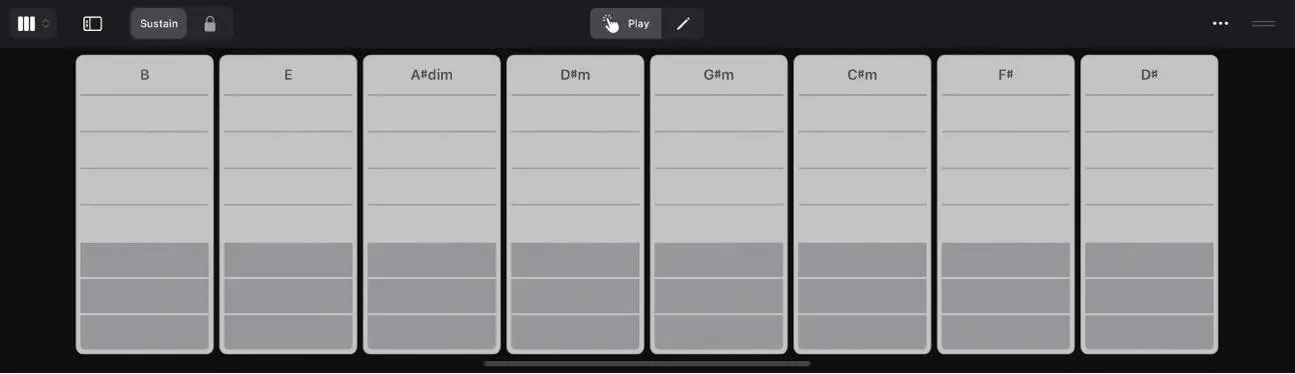
One global chord map can keep Bass, Keyboard, and other Session Players harmonically synchronized while individual regions can still break away.
FIELD PROCEDURE
- Show Global Tracks and enable Chords.
- Add or paste the project progression.
- Set Session Player regions to follow the global Chord Track.
- Use region chords only where one section needs a deliberate variation.
- Check the project key and the scale attached to each chord.
THE PLUG-IN ARSENALKnow the stock.
Know the stock.
Buy the gap.
Logic already contains a serious studio. Learn its instruments and effects by job, build chains with a reason, and add AUv3 tools only when they solve a limitation you can hear or a workflow you can name.
THE ORDER OF OPERATIONS
- Fix the source or performance
- Choose one stock tool
- Level-match the result
- Identify the remaining limitation
- Only then audition a purchase
01 · STOCK EFFECTS + INSTRUMENTS
Use the tool by job
These are starting moves, not sacred presets. Open the linked manual entry for every control.
Channel EQ
Sweep narrowly to find a problem, then cut broadly and modestly. Level-match before deciding it improved anything.
AVOID: Treating the analyzer as a target curve instead of listening.OPEN MANUAL · P.553 →Compressor
Start near 2:1. Lower threshold until the loudest moments move; slow attack for punch, faster attack for control, then time release to the groove.
AVOID: Turning up makeup gain and mistaking louder for better.OPEN MANUAL · P.536 →Enveloper
Raise attack for drums that need bite; reduce it to soften picks and clicks. Use release to lengthen or tighten the body.
AVOID: Trying to repair bad timing with extreme transient shaping.OPEN MANUAL · P.544 →ChromaGlow · Phat FX · Distortion
Drive until the character is obvious, then retreat. Parallel or low-mix settings usually keep the original articulation intact.
AVOID: Stacking saturation on every channel until the mix has no contrast.OPEN MANUAL · P.528 →ChromaVerb · Space Designer
Use an aux send. High-pass the return, shorten decay before lowering level, and add pre-delay when the source needs to stay forward.
AVOID: Inserting a fully wet reverb on every track.OPEN MANUAL · P.706 →Tape Delay · Delay Designer
Sync to tempo, filter the repeats, automate send level at phrase endings, and duck repeats when the lead needs space.
AVOID: Leaving full-range repeats under every lyric or melody note.OPEN MANUAL · P.524 →Alchemy · Sample Alchemy · Quick Sampler
Start from a useful patch, remove effects, learn the macro controls, then replace or resample one source at a time.
AVOID: Preset surfing without saving the musical idea first.OPEN MANUAL · P.744 →Drum Machine Designer · Step Sequencer
Lock kick and snare first; then vary velocity, gate, probability, repeats, and row length to create controlled instability.
AVOID: Randomizing every lane and losing the pulse.OPEN MANUAL · P.751 →Beat Breaker
Begin with one gesture, constrain its time range, and automate mix or bypass so destruction becomes arrangement punctuation.
AVOID: Running the same break pattern for the entire song.OPEN MANUAL · P.655 →Amp Designer · Bass Amp Designer · Pedalboard
Choose cabinet and mic before piling on pedals. High-pass only after the tone works in context.
AVOID: Judging an amp patch in solo and discovering it masks the vocal later.OPEN MANUAL · P.476 →Mastering Assistant
Balance the mix first, leave headroom, analyze the loudest section, and compare at matched loudness. Treat its result as a second opinion.
AVOID: Using mastering to repair clipping, harsh vocals, or a broken low end.OPEN MANUAL · P.605 →02 · REPEATABLE CHAINS
Signal paths with a reason
Order matters, but proof matters more. Each recipe ends with an audible test.
Clear lead vocal
Channel EQ → Compressor → light ChromaGlow → sendsRemove only what distracts, stabilize phrases, add density, then feed separate delay and reverb buses.
PROOF CHECKBypass the chain at matched loudness. Words should be easier to follow, not merely brighter.Punchy drum bus
Compressor → ChromaGlow or Phat FX → Channel EQUse slow-ish attack to retain hits, add harmonics, then correct any new mud or edge.
PROOF CHECKThe groove should feel denser without shrinking the kick transient.Industrial parallel crush
Send → Distortion/Phat FX → Compressor → filterDestroy a duplicate return, compress its chaos, remove brittle top or unusable sub, and blend beneath clean drums.
PROOF CHECKMute the clean bus: the return may sound ugly. Unmute it: the original must stay readable.Bass that translates
Channel EQ → Compressor → subtle saturationClean unusable sub-rumble, steady notes, then create harmonics that survive small speakers.
PROOF CHECKCheck on iPad speakers at low volume; the rhythm should remain identifiable.Wide guitar without mush
Amp/Pedalboard → Channel EQ → short room sendBuild the core tone first, trim conflicts in context, then give it a small shared acoustic space.
PROOF CHECKCollapse to mono. The part should not vanish or hollow out.Final-bus reality check
Metering → Mastering Assistant → limiter only if neededVerify peaks and balance, audition an informed suggestion, then control the final ceiling without chasing a number.
PROOF CHECKExport, re-import, and listen from start to finish with no red meters or surprise level jumps.03 · THIRD-PARTY AUv3
Curated, not collected
No plug-in is universally essential. These are credible upgrades and specialists, grouped by the problem they earn the right to solve.
Pro-Q 4
FabFilterFast precision EQ, dynamic EQ, spectrum work, and a touch-resizable AUv3 interface.
Best first premium purchase only when Channel EQ genuinely slows you down.VERIFY WITH MAKER ↗Brusfri
KlevgrandLearn-and-reduce broadband room, fan, and location noise before the creative chain.
A true problem-solver for imperfect recording spaces; capture cleaner audio whenever possible.VERIFY WITH MAKER ↗Pro-L 2
FabFilterDetailed final limiting and loudness control when Mastering Assistant is not surgical enough.
Useful for frequent releases; unnecessary while mixes still need balance and arrangement work.VERIFY WITH MAKER ↗ToneBoosters
ToneBoostersA broad AUv3 range for EQ, dynamics, correction, monitoring, and metering.
Strong value when you can name the exact missing job; do not buy a bundle to duplicate stock tools blindly.VERIFY WITH MAKER ↗MicroPitch / TriceraChorus
EventideDistinctive stereo widening, doubling, movement, and polished modulation.
Buy for the sound and performance controls, not because Logic lacks delay or chorus.VERIFY WITH MAKER ↗Koala FX
elf audioSixteen playable one-touch effects for live transitions, resampling, and deliberate wreckage.
Excellent for performance gestures that are slower to draw with conventional automation.VERIFY WITH MAKER ↗Sidekick
BLEASSKick synthesis, sequencing, and rhythmic ducking in one AUv3 device.
A focused shortcut for pumping electronic grooves; stock sidechain compression remains more general.VERIFY WITH MAKER ↗FAC Maxima / Medusa
Fred Anton CorvestTouch-forward level control and character dynamics with distinctly iPad-native workflows.
Choose after auditioning the behavior you want: simple level control or colored multiband compression.VERIFY WITH MAKER ↗Koala Sampler
elf audioRapid capture, chopping, sequencing, resampling, and beat sketching; can participate in AUv3 workflows.
A must-try companion for sample-first producers, not a replacement for Logic’s full arrangement system.VERIFY WITH MAKER ↗THE INSTRUMENT VAULTStop browsing.
Stop browsing.
Start sculpting.
Every stock instrument has a territory. Learn what it is for, make one deliberate sound, and turn performance into timbre. Then—and only then—add AUv3 instruments that open a musical door Logic does not.
PATCH-BUILDING DOCTRINE
- ROLEName the job: sub, pulse, hook, bed, impact, counterline.
- SOURCEChoose the engine whose physics match the sound.
- ENVELOPEShape attack, body, and release before effects.
- MOTIONAdd one envelope, LFO, macro, or performed gesture.
- CONTEXTTune it inside the arrangement at honest volume.
- COMMITSave, bounce, label, and move the bloody song forward.
01 · STOCK INSTRUMENT ATLASFourteen territories.
Fourteen territories.
No dead weight.
The fastest route into each instrument, the job it excels at, and one move that turns a patch into your sound.
Alchemy
Pads, evolving textures, cinematic layers, aggressive hybrids, resynthesis, and broad preset coverage.
START HEREChoose a patch close to the role, turn off its delay/reverb, then move the eight performance controls before opening deeper pages.
OPEN FULL MANUAL · P.744 →Sample Alchemy
Turning a voice, impact, room noise, guitar scrape, or field recording into playable granular, spectral, or additive material.
START HERERecord one clean, characterful sound. Trim silence, audition the synthesis modes, then map only the two controls you will perform.
OPEN FULL MANUAL · P.904 →Quick Sampler
Kicks, snares, found sounds, vocal fragments, tuned hits, single loops, and immediate playable sampling.
START HEREDrop in audio; choose Classic for a pitched instrument, One Shot for drums, Slice for phrases, or Recorder to capture directly.
OPEN FULL MANUAL · P.863 →Sampler
Keymapped multisamples, velocity layers, zones, sustained instruments, and detailed sample-library construction.
START HEREUse it when one sample is no longer enough. Build a small, reliable map before importing an entire archaeological dig.
OPEN FULL MANUAL · P.927 →Retro Synth
Analog basses, wavetable motion, sync leads, plucks, and simple FM without entering a cockpit full of cables.
START HEREPick an engine first. Set oscillator balance, shape the filter envelope, then add movement with one LFO.
OPEN FULL MANUAL · P.887 →Sculpture
Metal, glass, bowed strings, struck objects, alien percussion, evolving drones, and sounds that behave like imaginary materials.
START HEREChoose how the string is excited, set material and tension, then move the pickup positions before adding effects.
OPEN FULL MANUAL · P.928 →EFM1
Bells, electric keys, hard plucks, metallic percussion, cutting bass, and clean digital attacks.
START HEREBegin with a simple carrier tone. Raise FM amount until the timbre appears, then shorten the modulator envelope for a bright transient.
OPEN FULL MANUAL · P.766 →ES2
Complex analog-style patches, vector blends, layered motion, hard sync, evolving leads, and serious modulation routing.
START HEREInitialize, use one oscillator, one filter, and one envelope. Add the other oscillators only after the core sound works.
OPEN FULL MANUAL · P.798 →ES1 · ES P · ES M · ES E
Immediate bass, mono leads, strings, brass, and unfussy bread-and-butter parts with low decision overhead.
START HEREChoose the smallest instrument that can do the job. These are excellent when Alchemy would tempt you into forty minutes of browsing.
OPEN FULL MANUAL · P.774 →Drum Kit Designer
Natural kits, controllable kit pieces, realistic MIDI performance, and song-focused acoustic drum arrangements.
START HEREPick the kit for shell character, balance kick/snare/overheads, then shape the MIDI performance before reaching for compression.
OPEN FULL MANUAL · P.747 →Drum Machine Designer · Drum Synth
Pad-based kits, custom samples, synthetic kicks/snares/hats, layered percussion, and Step Sequencer integration.
START HEREBuild the kit around one excellent kick and snare. Tune every tonal drum to cooperate with the song’s key and bass.
OPEN FULL MANUAL · P.751 →Studio Bass · Studio Horns · Studio Strings
Convincing arranged parts with articulations, keyswitches, dynamics, and instrument-specific performance behavior.
START HEREWrite the line simply, select the right articulation for each phrase, and draw dynamics as musical breath—not flat velocity bars.
OPEN FULL MANUAL · P.970 →Vintage B3 · Vintage Clav · Vintage Electric Piano
Organ, clavinet, Rhodes/Wurlitzer-style parts, funk attacks, sustained gospel beds, and vintage keyboard character.
START HEREChoose the instrument and playing role first. Shape pickup/drawbar/tone controls, then match amp and modulation to the arrangement.
OPEN FULL MANUAL · P.995 →EVOC 20 Polysynth
Vocoder hooks, machine choirs, rhythmic speech, talking pads, and harmonically controlled vocal textures.
START HEREFeed a clear rhythmic vocal as the sidechain/modulator, play sustained chords, then balance voiced and unvoiced content for intelligibility.
OPEN FULL MANUAL · P.844 →02 · SOUND-DESIGN RECIPES
Build sounds that earn oxygen.
Eight repeatable recipes. Each ends with a test, because “that patch is fucking enormous in solo” is not a production method.
Retro Synth + Sample Alchemy
Rust King sub + teeth
- Build a centered mono sub in Retro Synth.
- Turn a scrape or breath into a moving upper texture.
- High-pass the texture so it cannot fight the fundamental.
- Compress or saturate them together lightly.
Drum Synth + Drum Machine Designer
Kick that punches, not pleads
- Tune the body to the track.
- Shorten decay until notes stop overlapping the bass.
- Layer a separate click/noise attack only if needed.
- Vary velocity without changing the anchor hits.
Quick Sampler
Mechanical percussion from anything
- Record a latch, pan, tool, or tabletop hit.
- Trim and fade the transient.
- Pitch copies into low, mid, and high roles.
- Sequence them with unequal row lengths.
Alchemy
Evolving dread pad
- Start with a dark sustained source.
- Remove excess built-in effects.
- Map brightness, motion, density, and space to macros.
- Record a slow performance gesture through the section.
Sculpture
Impossible bowed machine
- Select bowed excitation.
- Move material toward metal/glass.
- Adjust pickup positions for harmonics.
- Add slow body variation and print a long take.
Studio Strings
Expressive studio strings
- Write one singable line per section.
- Choose articulations phrase by phrase.
- Shape dynamics in arcs.
- Offset entrances only where players would naturally breathe.
EFM1
FM bell turned weapon
- Use a simple ratio.
- Raise FM depth for metallic sidebands.
- Shorten the modulator decay.
- Distort a parallel copy and automate its entrance.
EVOC 20 Polysynth
Vocoder people can understand
- Record dry, rhythmically exaggerated words.
- Use sustained chords with sensible voice leading.
- Balance voiced/unvoiced bands.
- Carve arrangement space around consonants.
03 · AUv3 INSTRUMENTS
Buy a new territory.
Not a universal ranking. This is a gap map: free doors first, focused character second, expensive specialist realism only when the performance demands it.
SynthMaster 3 Player
A broad modern preset instrument with an AUv3 version and a free factory library.
Start here if you need faster inspiration, not deeper programming. Upgrade only after the included sounds prove useful.VERIFY CURRENT VERSION ↗Decent Sampler
Free access to DecentSampler and SFZ-style community libraries, unusual acoustic instruments, and creator-made textures.
The best low-risk expansion when Logic lacks a particular sampled color. Library quality and licensing vary—verify each one.VERIFY CURRENT VERSION ↗Mariana
Purpose-built Moog bass character, dual-layer weight, modulation, and AUv3 integration.
For producers who want a specific Moog low-end personality. It is not required to make excellent bass with Retro Synth or Alchemy.VERIFY CURRENT VERSION ↗Zeeon
Touch-friendly analog circuit modeling, strong filters, audio-rate modulation, and focused sound design.
A superb character synth when stock instruments feel broad but not immediate. Choose Sunrizer instead if supersaw performance is the actual goal.VERIFY CURRENT VERSION ↗SynthMaster 2
A deep dual-layer synth spanning virtual analog, wavetable, additive, vector, modulation, sequencing, and a large preset ecosystem.
A high-value all-rounder for someone who wants one additional synth, but overlaps Alchemy heavily—buy for workflow or library, not feature-count combat.VERIFY CURRENT VERSION ↗BeatHawk
A portable sample workstation with polished instrument and drum expansions that can participate in AUv3 workflows.
Best when a specific UVI sound pack fills an arrangement gap. Preview and buy only the libraries you will actually use.VERIFY CURRENT VERSION ↗Pianoteq 9
Physically modeled acoustic/electric pianos and related instruments with detailed response and a compact footprint.
A serious pianist’s upgrade when touch, pedaling, tuning, and playability matter more than browsing another sample pack.VERIFY CURRENT VERSION ↗SWAM instruments
Expressive modeled solo strings, woodwinds, and brass designed for continuous control rather than static sample playback.
Transformative with breath, expression pedal, MPE, or carefully drawn automation; disappointing if performed like an organ patch.VERIFY CURRENT VERSION ↗Drambo
Modular synthesis, sampling, sequencing, and custom instrument construction inside an AUv3-capable environment.
For builders who enjoy designing systems. Overkill when the goal is simply to play a convincing piano before lunch.VERIFY CURRENT VERSION ↗04 · FREE + CHEAP BY JOBProtect the wallet.
Protect the wallet.
Still make the noise.
Every major instrument territory gets a free-first route and a focused low-cost step. Repeated apps are intentional: a small, understood toolkit beats a landfill of bargains.
PRICE POLICY
FREE means the listed instrument or useful tier can be used without payment. CHEAP means low-cost relative to premium iPad instruments, not a permanent price promise. Prices, sales, IAPs, and regional availability change—verify the linked US App Store or maker page before buying.
VERIFIED · AUGUST 14, 2026Analog basses, pads, and leads
FREE FIRST
AudioKit Synth One J6
Free AUv3 with vintage-inspired oscillators, modulation, arpeggiator, sequencer, and no required purchase.
VERIFY / OPEN →CHEAP STEP
Zeeon
Usually inexpensive and deliberately focused: convincing analog-modeling character, strong filters, and a fast touch interface.
CHECK CURRENT PRICE →Modern hybrid and preset synthesis
FREE FIRST
SynthMaster 3 Player
Free AUv3 player with 200 factory presets drawn from several SynthMaster engines; excellent for quick auditioning.
VERIFY / OPEN →CHEAP STEP
SynthMaster 2
A relatively low-cost full synth with virtual analog, wavetable, additive, vector, deep modulation, and a large library.
CHECK CURRENT PRICE →Sub bass, 808s, and tuned kicks
FREE FIRST
Logic Drum Synth + Retro Synth
Already included. Drum Synth handles tuned kick bodies; Retro Synth supplies clean sub and harmonics without another install.
VERIFY / OPEN →CHEAP STEP
King of Bass
A low-cost AUv3 specializing in analog bass, 808 subs, and tuned kick creation; App Store sales change frequently.
CHECK CURRENT PRICE →FM keys, bells, and digital attacks
FREE FIRST
King of FM
Free AUv3 with a large collection of classic FM-style electric pianos, bells, basses, and digital presets.
VERIFY / OPEN →CHEAP STEP
Mellowsound
The free tier adds flute, clarinet, and sax; inexpensive expansions add vintage tape keys, strings, brass, and oddities.
CHECK CURRENT PRICE →Acoustic piano and electric keys
FREE FIRST
Numa Player
Completely free multitimbral player with piano, electric-keyboard, and other playable sounds plus SoundFont loading.
VERIFY / OPEN →CHEAP STEP
HOUSE: Mark I
A focused, inexpensive electric-piano AUv3 for producers who want a ready-to-play Mark I color without a large workstation.
CHECK CURRENT PRICE →Strings, brass, winds, and orchestral color
FREE FIRST
Decent Sampler
Free AUv3 player with many free community libraries. Quality, microphone perspective, range, and licensing vary by library.
VERIFY / OPEN →CHEAP STEP
Mellowsound expansions
Low-cost vintage Mellotron/Chamberlin-style strings, brass, winds, choir-like textures, and character instruments—not modern realism.
CHECK CURRENT PRICE →Unusual acoustic and world instruments
FREE FIRST
Decent Sampler libraries
The strongest free doorway into creator-built plucks, percussion, folk instruments, prepared sounds, and intimate oddities.
VERIFY / OPEN →CHEAP STEP
BeatHawk
Free to download with individually purchasable UVI sound packs. Preview the exact expansion and buy one territory at a time.
CHECK CURRENT PRICE →Drums and percussion
FREE FIRST
Logic Drum Machine Designer
Already included and tightly integrated with Drum Synth, Quick Sampler, Step Sequencer, pad editing, and track routing.
VERIFY / OPEN →CHEAP STEP
BeatHawk
The free shell and optional focused drum/percussion packs can add polished genre kits without buying a giant library.
CHECK CURRENT PRICE →Sampling and open libraries
FREE FIRST
Decent Sampler
Free AUv3 for DecentSampler-format libraries and supported SFZ workflows; excellent breadth at zero entry price.
VERIFY / OPEN →CHEAP STEP
Soundfont Pro
Free download with in-app options for people who specifically need editable SoundFont playback and library management.
CHECK CURRENT PRICE →Vintage tape, lo-fi, and haunted keys
FREE FIRST
Mellowsound
Three free vintage wind instruments and full AUv3 operation; enough to test whether its tape character belongs in your music.
VERIFY / OPEN →CHEAP STEP
Full Mellowsound tier
A modest one-time expansion unlocks the core Mellotron-style set; extra Chamberlin colors remain optional.
CHECK CURRENT PRICE →Experimental, modular, and impossible instruments
FREE FIRST
Logic Sculpture + Sample Alchemy
Already included. Together they cover physical modeling, granular, spectral, additive, motion, and deeply performable mutation.
VERIFY / OPEN →CHEAP STEP
Drambo
Not free, but strong value for modular builders because it combines synthesis, sampling, sequencing, and custom systems.
CHECK CURRENT PRICE →VISUAL INTERFACE ATLAS · 06 INTERACTIVE MAPSStop describing.
Stop describing.
Point.
Six core Logic workspaces, pulled from the supplied June 2026 guide and made large enough to study. Open a map, then tap any control name to locate it.
Interface images reproduced from the user-supplied Logic Pro User Guide for iPad, Apple Inc., June 2026, for instructional reference.
COMPOSITION CODEX · 12 TERRITORIES · 36 MOVESSomething for
Something for
everything.
Not inspiration wallpaper. A searchable field guide for the exact moment you are stuck—from the first two notes to the last merciful export.
BLANK-PAGE EMERGENCY
- Choose an emotion or scene
- Write a 2–5 note cell
- Make three variations
- Map the section energy
- Finish a rough 90 seconds
36 MOVES FOUND
10-MINUTE EXERCISE
Write: ‘This should feel like ___ doing ___.’ Choose tempo, palette, and pulse from that sentence.
LOGIC PRO FOR iPAD MOVE
SOURCE TRAIL · Berklee · Songwriting Fundamentals ↗Create an 8-bar cycle and name the project with the sentence—not ‘New Project 47.’
GENRE BLUEPRINTS · 12 STARTING SYSTEMSLearn the rules.
Learn the rules.
Then scar them.
Genres are shared expectations, not prison cells. Use these maps to become legible fast—then make one choice that could only have come from you.
MACHINE MUSIC
80–130 BPM · half-time or marchingIndustrial
PULSE
Rigid anchors with damaged secondary percussion, rotating accents, found-sound punctuation, and strategic negative space.
HARMONIC LANGUAGE
Pedal tones, chromatic cells, minor seconds, tritones, and harmonically ambiguous root–fifth weight.
FORM ENGINE
Process as form: establish the machine, corrupt it, strip it bare, then return it physically altered.
SOUND ROLESKick/snare = chassisBass = motorNoise = environmentVoice/riff = human scar
20-MINUTE LOGIC PRO FOR iPAD BUILD
- Make an 8-bar DMD pattern with only kick, snare, and one metal hit.
- Give the metal row a different length; vary velocity before adding notes.
- Write a 2–4 note chromatic riff over a pedal bass.
- Automate one degradation process across four sections.
THEORY BENEATH THE BLUEPRINTSAbleton Learning Music ↗Berklee Arranging ↗Open Music Theory ↗Tempo ranges are starting zones, never laws.
PRODUCTION FIELDCRAFT · STOCK LOGIC TOOLSMake it
Make it
hit.
Practical starting points for impact, weight, tension, and movement. These are recipes to test with your ears—not commandments carved into a compressor faceplate.
THE RULEPick a job. Make one move. Level-match. Listen in context.Anything else is knob tourism.
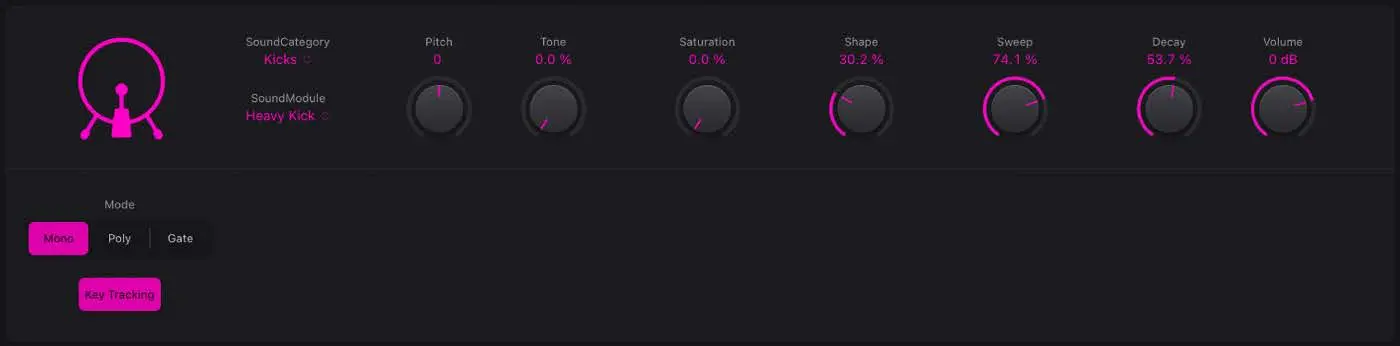
LOGIC CHAINDRUM SYNTH KICK → ENVELOPER → CHANNEL EQ → CHROMAGLOW
MAKE THE MOVES
- Start with Drum Synth Kicks or one strong DMD sample. Tune Pitch while the bass plays; the right pitch feels bigger before it meters louder.
- Shorten Decay until one hit gets out of the next hit’s way. Use Sweep, Shape, and Tone to expose the front edge before reaching for EQ.
- In Enveloper, raise Attack gently. If the kick becomes papery, back off—you have promoted the click and fired the body.
- Add modest saturation so the kick speaks on small speakers. Level-match before deciding it improved anything.
02 · ENCYCLOPEDIAEvery control.
Every control.
Every hidden door.
The complete June 2026 Logic Pro for iPad guide has been transformed into a navigable knowledge system: 22 domains, 1,149 indexed topics, and 1,088 searchable pages.
OPENING THE OFFICIAL INDEX…The 1,088-page encyclopedia loads only when needed so the rest of the field manual arrives faster.
02
Protocol archive
26 field procedures. Every decoded answer opens the next useful branch.
Create the right track, choose the input, set safe gain, monitor without feedback, and capture the take.
Execute protocol
- Connect the audio interface before opening the project.
- Tap Add Track and choose Audio.
- Open the track inspector and choose the interface input carrying the microphone.
- Turn on Record Enable. Use Input Monitoring only when you are listening through headphones.
- Sing the loudest line and set interface gain so the meter stays healthy without reaching red.
- Set the playhead, choose a count-in if needed, and tap Record.
SIGNAL STILL DARK?
Trace the fault. Query the archive.
Start with the decision trees, decode the detailed answers for common jobs, and scan all 1,149 official topics when the fault lives deeper in Logic.